Joplin
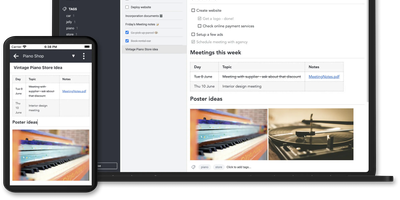
Notes on Windows, macOS, Linux, Android, iOS, and the terminal, synced through your own server: Joplin pairs its open-source clients with Joplin Server, the official self-hosted backend that replaces Dropbox, OneDrive, or Nextcloud as the synchronization target. Notes are Markdown with inline attachments (images, PDFs, audio), organized into hierarchical notebooks and sub-notebooks with cross-cutting tags, alongside to-do lists with reminders and alarms. End-to-end encryption is the headline feature: enabled in the clients, it encrypts sync payloads on-device before upload, so the server stores blobs it cannot read - genuine protection even if the host is compromised. The desktop app offers both Rich Text and Markdown editors, extended by a plugin ecosystem, custom themes, and an Extension API for writing your own scripts; a Web Clipper for Chrome and Firefox captures full pages or screenshots straight into notebooks. Joplin Server ships as a Docker image with SQLite for evaluation and PostgreSQL for production, offers a filesystem storage driver for large content, and includes multi-user support and note sharing - all free under AGPL-3.0 when self-hosted. Notes stay in an open format, so the exit path always exists.
Memos
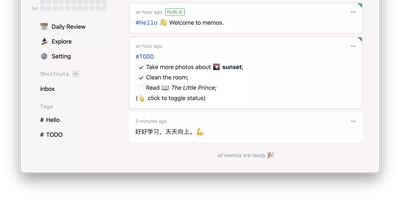
Open the page, write a Markdown note, move on - Memos is a lightweight, self-hosted service built for quick capture. Instead of folders, notebooks, and titles, it presents a timeline: open the page, write a Markdown note, and move on. Notes support headings, code blocks with syntax highlighting, task lists, tables, and file attachments, with tags auto-extracted from #hashtags in the text. Each memo carries a visibility level, private, protected (logged-in users), or public, so one instance works as a personal log, a small team wiki, or a lightweight microblog. The backend is a single Go binary with a React frontend, around 50 MB of memory at runtime and a ~20 MB Docker image, so it fits comfortably on the smallest instance size with near-zero maintenance. SQLite is the default store, with MySQL and PostgreSQL supported for multi-user deployments needing more concurrency, and full REST and gRPC APIs - Connect RPC for browsers, gRPC-Gateway for external tools - make capture scriptable from CLIs, bots, and automation platforms. Fast full-text search spans all memos, pinned notes keep references handy, and a masonry view suits visual browsing. MIT-licensed with zero telemetry; content is stored as plain Markdown in a database you control, so notes remain readable, exportable, and free of proprietary formats.
GroqNotes
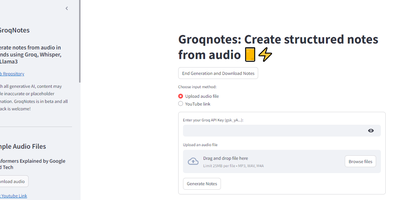
Introducing Groqnotes, the app that takes your audio lectures and transforms them into organized notes faster than you can say 'I should have paid more attention in class!' With the power of Groq's Whisper API, this Streamlit marvel listens to your lectures and then channels its inner librarian to create structured notes that even your future self will thank you for. It’s like having a personal assistant who never sleeps, fueled by a mix of Llama3-8b and Llama3-70b—because why settle for one when you can have two brainy llamas working for you? The larger model crafts the grand architecture of your notes, while the speedy one fills in the juicy details, ensuring you get the best of both worlds. So, whether you’re cramming for finals or just trying to make sense of your professor's 3-hour monologue on quantum physics, Groqnotes has got your back. Say goodbye to chaotic scribbles and hello to notes that are as organized as your sock drawer (or at least, we hope so)! Get ready to impress your classmates and maybe even your professors with notes that look like they were crafted by a team of caffeinated scholars. Groqnotes: because who needs sleep when you have structured notes?