Heimdall
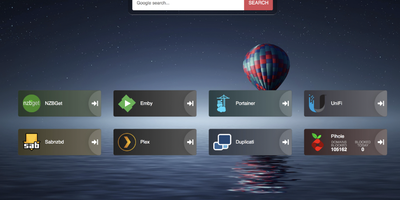
Links stop drowning in browser bookmarks once Heimdall - the application dashboard from the LinuxServer.io team - gives every web app and service you run a single, organized front door. Items come in three tiers. Generic items link to anything on the web with a name, color, and optional icon. Foundation apps are recognized as you type, auto-filling the application's icon and tile color so a full homelab dashboard assembles in minutes. Enhanced apps go further: supply API credentials and the tile shows live data - queue size and download speed for SABnzbd and NZBGet, plus integrations for Sonarr, Radarr, Plex, Jellyfin, Pi-hole, Portainer, Transmission, and many more. There are no iframes and no apps-within-apps; tiles are honest links with real-time stats layered on. Tiles arrange by drag and drop, backgrounds are customizable, an optional search bar (Google, Bing, or DuckDuckGo) makes it work as a browser start page, and optional multi-user authentication keeps dashboards personal. Built on Laravel with SQLite file-based storage - no external database - it stays light, responsive on mobile, and simple to back up. A natural first deployment: the page that ties every other self-hosted service together.
Flame
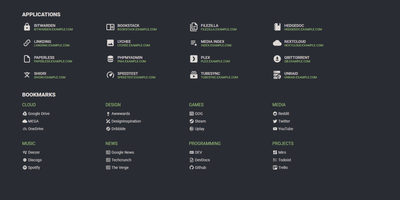
A server full of scattered services becomes one clean application hub under Flame - a self-hosted startpage where every bit of configuration happens in built-in GUI editors, never a config file. Applications and bookmarks are created, edited, and organized into categories directly in the browser, and favorites pin to the homescreen for one-click access. The integrated search bar filters your apps and bookmarks locally as you type, and prefix shortcuts (like /g for Google) route queries to any of 11 web search providers or custom ones you define, making Flame a genuine browser homepage rather than a static link wall. Docker integration is the standout for homelabs: mount the Docker socket, add flame.type, flame.name, and flame.url labels to containers, and new services appear on the dashboard automatically - Kubernetes Ingress annotations work the same way. A weather widget shows temperature, cloud coverage, and animated conditions for your coordinates, and password authentication protects settings and items. Appearance is deeply customizable with 15 built-in color themes, a custom theme builder, and full custom CSS support. The stack is Node.js with SQLite behind a React frontend - light, fast, and inspired by the minimalist SUI design.
Trilium Notes
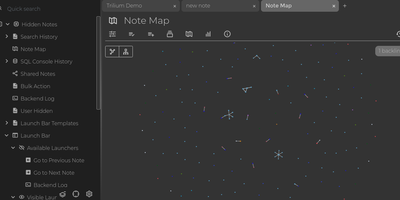
For people whose notes number in the tens of thousands, Trilium Notes is the hierarchical note-taking application built specifically for large personal knowledge bases - actively maintained as TriliumNext. Notes arrange into arbitrarily deep trees where every note is both content and container, and cloning lets a single note live in multiple places at once - bash notes belong under both Linux and Scripting, and Trilium refuses to make you choose. A WYSIWYG editor handles rich text, tables, math, and syntax-highlighted code blocks with Markdown-style shortcuts, while dedicated note types cover Excalidraw sketches, mind maps, geo maps with GPX tracks, relation maps that visualize connections between notes, and tables with typed columns. The attribute system is the power layer: labels attach queryable metadata (#year=1999, #author), relations create named links between notes, and both inherit down the tree - feeding full-text search, saved queries, and scripting. Scripting is Trilium's deepest differentiator: JavaScript code notes run on events like note changes or hourly schedules, build custom widgets, and add server-side logic, turning the knowledge base into a programmable platform. Protected notes encrypt sensitive content, note hoisting focuses on subtrees, and the self-hosted server syncs desktop clients across devices.
Servas
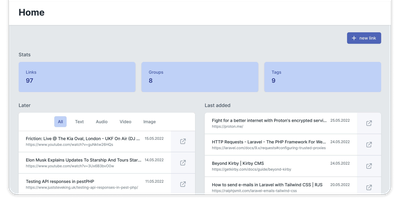
Get ready to turbocharge your bookmark chaos into a well-oiled machine with Servas, the self-hosted bookmark wizard! Wave goodbye to the days of digital clutter and say hello to a world where your favorite links are as organized as a librarian's bookshelf. With Servas, you can tag-team your URLs into submission, categorizing them with the finesse of a ninja using tags, groups, and even the mystical art of nesting. But wait, there's more! The 'Later List' is your digital pocket, ready to safely tuck away those 'read-me-soon' treasures for a rainy day. And for those who live life on the edge of their browser, the Servas Chrome extension is your trusty sidekick, zapping sites into your collection faster than you can say 'bookmark'. Multiple user accounts? Check. A design so responsive it practically does yoga? Double-check. And for the security-conscious, Servas flexes its muscles with Two Factor Authentication. Hosted on RepoCloud, your bookmarks won't just be organized; they'll be living the high life on cloud nine, without the sky-high costs. So, why settle for less when you can have the best seat in the house for your bookmarks with Servas on RepoCloud?
Lychee
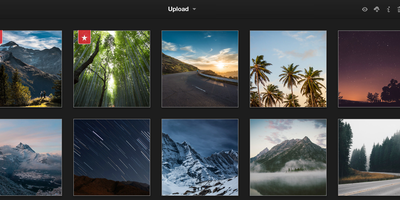
Say 'cheese' to Lychee, the open-source photo wrangler that turns your chaotic photo collection into a well-organized gallery of wonders – without costing you a dime! Imagine a world where uploading, renaming, and describing your snapshots is as easy as pie, and you can do it all from the comfort of your web browser. Share your pictorial masterpieces with a single click, or go all 'Mission Impossible' with password protection to keep those nosy parkers at bay. Want to see your memories in all their glory? Full-screen mode and keyboard navigation have got you covered. Flaunt your photos to the public or keep them under wraps – the choice is yours. With Lychee, you're the curator of your own digital museum, complete with batch editing superpowers and the ability to spill the beans on every photo's backstory with EXIF and IPTC Metadata. Import from here, there, and everywhere, tag to your heart's content, and highlight your top shots. All this, wrapped up in a sleek interface that'll make your heart skip a beat. And thanks to RepoCloud's hosting, you can snap away without worrying about storage space or your wallet – it's unlimited, uncompressed, and utterly fabulous. Get ready to give your photos a home they deserve with Lychee!
linkding
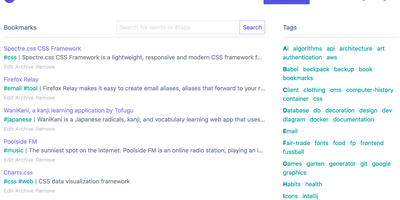
For people who found del.icio.us perfect and everything since bloated, linkding is the bookmark manager - a Django application whose entire design goal is saving and finding links with zero friction. Paste a URL and it fetches the title, description, favicon, and preview image automatically; organize with tags, search full-text across everything, mark bookmarks unread for read-it-later, attach Markdown notes, and bulk-edit whole selections at once. Its answer to link rot is archiving: bookmarked pages can be snapshotted automatically, either submitted to the Internet Archive or saved as local HTML files, and a documented SingleFile browser-extension integration uploads full self-contained page captures straight to your instance. Official Firefox and Chrome extensions (plus a bookmarklet) make saving a one-click habit, the UI installs as a Progressive Web App on mobile, and multi-user support with bookmark sharing - to users or logged-out guests - covers families and teams, with SSO via OIDC when needed. The REST API (create, search, filter by tag) has spawned a genuine ecosystem of community mobile apps and libraries. Operationally it is famously boring in the best way: one small container, SQLite by default, automated migrations, and a zero-breaking-changes policy. Import and export use standard Netscape HTML. MIT-licensed.