LibreOffice
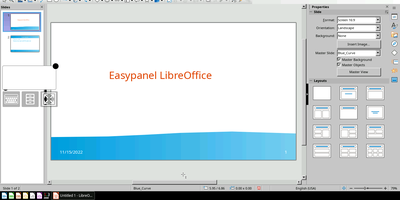
Unleash the might of your creative genius and productivity prowess with LibreOffice, the open-source office suite that's so much more than a mere heir to OpenOffice.org. With a user interface cleaner than a monk's eating habits and a toolbox more feature-stuffed than a Thanksgiving turkey, you'll be crafting documents, spreadsheets, and presentations that dazzle and delight. Glide over to http://yourhost:3000/ or secure your seatbelt for the https journey to https://yourhost:3001/ and experience the digital equivalent of a high-definition, no-pixel-left-behind image streamed right to your web browser at speeds that would make a cheetah envious. And because it's built to play nice with a smorgasbord of architectures, you can fire it up on virtually any device. Host it on RepoCloud, where the cost is as tiny as the footprint of a digital ant, and you've got yourself the Swiss Army knife of office suites for all your document wrangling needs.
WPS Office
description_humorous
Cryptpad
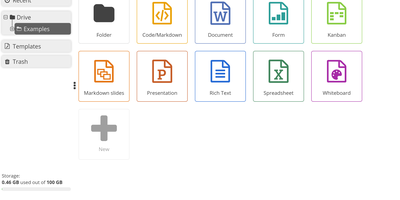
Get ready to collaborate like a super-spy with CryptPad, the open-source office suite that's as secure as a vault in Fort Knox! Wave goodbye to prying eyes because with end-to-end encryption, your secrets are safer than a squirrel's nut stash. Dive into a smorgasbord of applications and cook up projects with your pals or professional partners in real-time. Planning an epic adventure or plotting world domination in a client meeting? CryptPad's got you covered. And the best part? You can jump straight into the action without the hassle of sign-ups or downloads. It's not just an editor; it's your encrypted command center for all things teamwork. Host it on RepoCloud, and you'll be saving more than just your data – you'll be saving dough, too!
Paperless-ngx
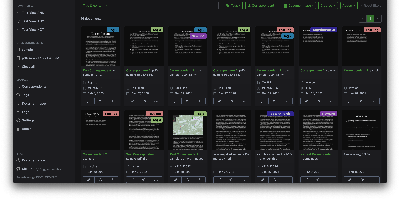
A pile of paper becomes a searchable digital archive under Paperless-ngx, the community-maintained document management system. The pipeline is what makes it work: drop a file into the consumption folder (or let it poll an email inbox), and a worker hashes it for duplicate detection, routes it by type, runs OCRmyPDF with Tesseract (100+ languages) on anything without a text layer, and produces an archivable PDF/A with invisible selectable text embedded - so Ctrl+F works on your scans. Then the smart part: a scikit-learn classifier (TF-IDF plus multi-label prediction) trained on your own tagged documents automatically assigns tags, correspondents, and document types to new arrivals, alongside rule-based exact, keyword, and regex matching for deterministic cases. Full-text search includes relevance ranking, match highlighting, autocomplete, and "more like this" similarity search. Apache Tika integration extends consumption to Word, Excel, PowerPoint, and LibreOffice formats. The Django/Angular app adds custom fields, saved views on a customizable dashboard, bulk editing, workflow automation triggered on upload or matching, shareable public links with expiration, and a robust permissions system with per-document access control. Metadata lives in PostgreSQL with Redis-queued Celery workers processing documents in parallel. Your tax records, invoices, and contracts stay on your server - searchable in seconds, never in someone else's cloud.
Collabora Office
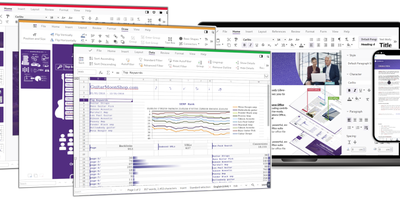
Real LibreOffice document engineering in the browser: Collabora Online is built by the company employing much of the former SUSE LibreOffice team - not a reimplementation. This deployment runs CODE (Collabora Online Development Edition), the collabora/code server that renders and edits documents entirely server-side while browsers get high-fidelity WYSIWYG output, so layout and formatting survive round-trips that break lesser converters. Four editors ship in one container: Writer for text documents (comments, track changes with comparison and restoration, form handling), Calc for spreadsheets (advanced formulas, macros, pivot tables, per-user sheet views, server-enforced cell protection), Impress for presentations, and Draw for Visio-class diagrams. Format compatibility spans DOCX, XLSX, PPTX, the ODF family, PDF, and dozens more - including Visio and Publisher import. Real-time collaborative editing supports multiple simultaneous editors with visible cursors and commenting. The architectural point: documents are processed on your server and never leave it, which is why Collabora is the engine behind Nextcloud Office and integrates with ownCloud, Seafile, and any WOPI-speaking host - or embeds in your own application via the SDK. An admin console monitors sessions and memory. For organizations that need Google Docs-style collaboration with actual data sovereignty, this is the reference open-source answer.
Nextcloud
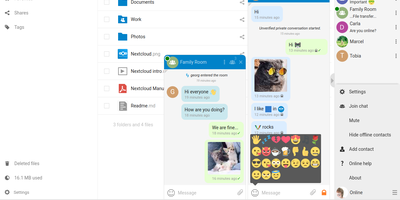
Google Workspace and Microsoft 365, replaced by a platform you actually control: Nextcloud is the self-hosted digital workspace. Files is the core: file storage and sync across desktop, mobile, and web clients, with sharing, versioning, and collaboration built in. Around it, Talk provides private text chat, audio/video conferencing with screen sharing, SIP integration, and persistent voice rooms; Groupware bundles calendar, contacts, and mail with delegation support; and Office offers two collaborative suites - the Collabora-based option with deep ODF support, and Euro-Office, whose local-processing architecture delivers strong Microsoft Office compatibility and fast browser rendering with reduced server load. The Nextcloud Assistant threads AI through the platform via a context-aware sidebar, Whiteboard covers visual collaboration, Flow handles automation, and an app ecosystem of hundreds of extensions adds everything from Kanban boards to end-to-end encryption. Hub 26 brings a lighter UI with a unified app switcher and Nextcloud Governance for organizations under strict regulatory requirements. This is the flagship of data sovereignty: your files, chats, calendars, and documents live on your server, under your jurisdiction, with GDPR compliance by architecture rather than by contract.
StirlingPDF
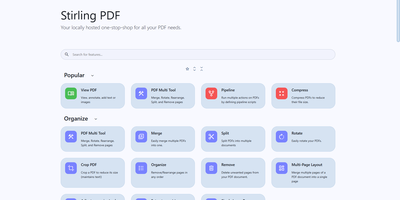
Adobe Acrobat and Smallpdf, answered by a self-hosted Java web application: Stirling PDF processes every file with its 60+ tools on your own server and deletes it after the task completes. Nothing is uploaded to a third party, which is the whole point for contracts, invoices, and medical records. The toolbox covers page operations (merge, split at page numbers or scanned dividers, rotate, reorder, crop, extract), conversion in both directions between PDF and Word, Excel, PowerPoint, images, HTML, and Markdown, OCR that turns scans into searchable PDFs via Tesseract/OCRmyPDF (including PDF/A archival conversion), and security tools for passwords, permissions, watermarks, signatures, and true UI-driven text redaction. A built-in viewer handles annotation, drawing, and text or image insertion, and V2 added stateful processing - upload once, chain multiple tools - plus undo/redo history. For automation, nearly every tool has a REST API endpoint, no-code pipelines combine operations into custom logic chains, and watched folders process files automatically. Enterprise deployments get SSO, user management, and audit logging; the interface ships in 40+ languages. With 84K+ GitHub stars it is the most popular PDF tool in self-hosting, replacing $20/month Acrobat subscriptions with flat infrastructure cost.