Joplin
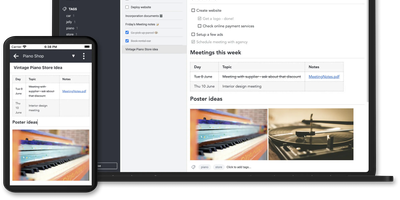
Notes on Windows, macOS, Linux, Android, iOS, and the terminal, synced through your own server: Joplin pairs its open-source clients with Joplin Server, the official self-hosted backend that replaces Dropbox, OneDrive, or Nextcloud as the synchronization target. Notes are Markdown with inline attachments (images, PDFs, audio), organized into hierarchical notebooks and sub-notebooks with cross-cutting tags, alongside to-do lists with reminders and alarms. End-to-end encryption is the headline feature: enabled in the clients, it encrypts sync payloads on-device before upload, so the server stores blobs it cannot read - genuine protection even if the host is compromised. The desktop app offers both Rich Text and Markdown editors, extended by a plugin ecosystem, custom themes, and an Extension API for writing your own scripts; a Web Clipper for Chrome and Firefox captures full pages or screenshots straight into notebooks. Joplin Server ships as a Docker image with SQLite for evaluation and PostgreSQL for production, offers a filesystem storage driver for large content, and includes multi-user support and note sharing - all free under AGPL-3.0 when self-hosted. Notes stay in an open format, so the exit path always exists.
Trilium Notes
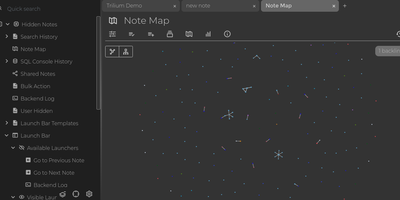
For people whose notes number in the tens of thousands, Trilium Notes is the hierarchical note-taking application built specifically for large personal knowledge bases - actively maintained as TriliumNext. Notes arrange into arbitrarily deep trees where every note is both content and container, and cloning lets a single note live in multiple places at once - bash notes belong under both Linux and Scripting, and Trilium refuses to make you choose. A WYSIWYG editor handles rich text, tables, math, and syntax-highlighted code blocks with Markdown-style shortcuts, while dedicated note types cover Excalidraw sketches, mind maps, geo maps with GPX tracks, relation maps that visualize connections between notes, and tables with typed columns. The attribute system is the power layer: labels attach queryable metadata (#year=1999, #author), relations create named links between notes, and both inherit down the tree - feeding full-text search, saved queries, and scripting. Scripting is Trilium's deepest differentiator: JavaScript code notes run on events like note changes or hourly schedules, build custom widgets, and add server-side logic, turning the knowledge base into a programmable platform. Protected notes encrypt sensitive content, note hoisting focuses on subtrees, and the self-hosted server syncs desktop clients across devices.
Logseq
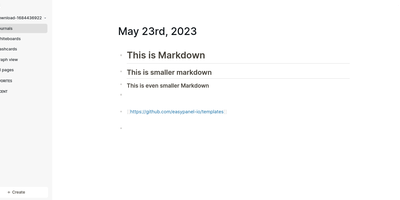
Every line an indentable bullet, every bullet a first-class block that can be referenced, embedded, and queried anywhere: Logseq is a privacy-first, local-first knowledge platform built around the block outliner. The daily journal is the system's beating heart - each day opens a fresh date-stamped page where tasks, meeting notes, and fleeting ideas land as blocks without filing decisions, then connect later through [[wikilinks]] with automatic bidirectional backlinks and ((block references)) that transclude any bullet into any page. Everything persists as plain Markdown or Org-mode files on disk - git-friendly, greppable, and owned forever, with sync via iCloud, Dropbox, Syncthing, Git, or an optional end-to-end encrypted service. Built-in tooling goes beyond notes: TODO/DOING task states with scheduling, native PDF annotation with area highlights, spaced-repetition flashcards, whiteboards for visual thinking, Zotero integration for researchers, and Datalog-powered queries that build dynamic views across the entire graph. A marketplace of hundreds of community plugins and themes adds AI chat, Ollama local-model integration, and custom workflows. Written in Clojure/ClojureScript, AGPL-3.0 licensed with 320+ contributors, and completely free - the local-first Roam for people who refuse subscriptions and lock-in.
Groqnotes
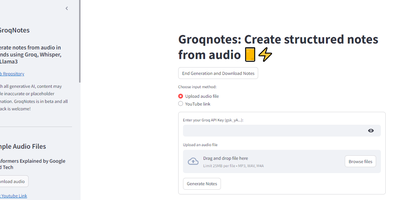
Ever wished your lecture notes could magically organize themselves while you daydream about your next coding project? Enter Groqnotes, the Streamlit app that turns your audio ramblings into structured, coherent notes faster than you can say 'Whisper API.' Using Groq's Whisper to transcribe your audio and a tag team of Llama3-8b and Llama3-70b models, this app is like having a personal assistant who never misses a detail. The larger Llama3-70b handles the heavy lifting of creating a solid note structure, while the nimble Llama3-8b fills in the content with the grace of a caffeinated coder. Say goodbye to messy notebooks and hello to organized brilliance, all without lifting a finger. Just click, speak, and let Groqnotes do the rest. It's like magic, but with more llamas.
HedgeDoc
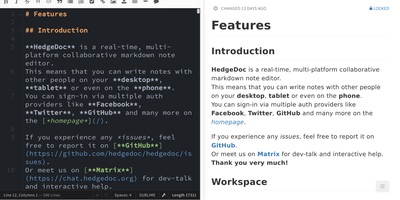
Real-time collaborative Markdown behind your own firewall: HedgeDoc (formerly CodiMD, descended from HackMD's open-source edition) keeps team notes on team infrastructure. Share a note's URL and collaborators are editing together instantly - live cursors, changes appearing keystroke by keystroke - in a three-mode interface that toggles between raw Markdown, rendered preview, and side-by-side split. The Markdown dialect is extended where engineers need it: Mermaid, Graphviz, and Vega-Lite diagrams, MathJax for equations, syntax-highlighted code blocks, embedded content, and a presentation mode that turns a note into reveal.js slides with a single YAML header. A dropdown permission system controls each note - freely editable, limited to signed-in users, or locked read-only - and published notes become clean read-only pages for wider distribution. Revisions track every change with the ability to revert to any earlier version. The AGPL-3.0 codebase is light enough to run on a Raspberry Pi and deploys via Docker with PostgreSQL, MySQL, or SQLite. Authentication covers LDAP, SAML, OAuth2, and email. It deliberately stays a focused document editor - no page trees or kanban - and does that one job with excellent keyboard-first ergonomics for meeting notes, RFCs, runbooks, and shared scratchpads.
Khoj
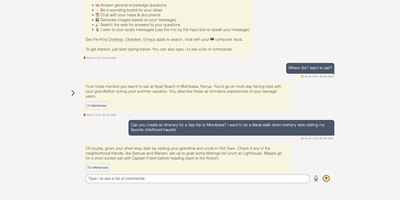
A self-hosted "second brain": Khoj indexes your own files and answers questions from them, parsing Markdown (whole Obsidian vaults included), org-mode, PDF, Word, plain text, Notion pages, GitHub repositories, and images described by a vision model, then embedding everything with sentence-transformers into a vector index for semantic search and RAG with cited sources. Any LLM backend works: local models like Llama, Qwen, or Mistral via Ollama, or cloud models like GPT, Claude, and Gemini. You can build custom agents, each with its own persona, scoped knowledge base, chat model, and tools such as web search and code execution. Scheduled automations run recurring research and deliver newsletters or notifications to your inbox, and research mode performs multi-hop web searches with inline citations. Access it from a browser, the Obsidian plugin, Emacs, desktop, or WhatsApp - all clients connect to the same self-hosted instance, making Khoj one of the few AI assistants Emacs users can point at decades of org files. Semantic search means recall works without exact keywords: "that paper about forecasting with transformers" surfaces the right PDF even when you cannot remember its title. Switching LLM backends never requires re-indexing your documents, and with a local model via Ollama, even inference stays on hardware you control - journals, research, and private notes are never sent anywhere. Python/FastAPI stack, AGPL-licensed, with PostgreSQL storage.
Memos
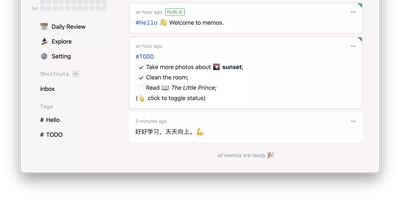
Open the page, write a Markdown note, move on - Memos is a lightweight, self-hosted service built for quick capture. Instead of folders, notebooks, and titles, it presents a timeline: open the page, write a Markdown note, and move on. Notes support headings, code blocks with syntax highlighting, task lists, tables, and file attachments, with tags auto-extracted from #hashtags in the text. Each memo carries a visibility level, private, protected (logged-in users), or public, so one instance works as a personal log, a small team wiki, or a lightweight microblog. The backend is a single Go binary with a React frontend, around 50 MB of memory at runtime and a ~20 MB Docker image, so it fits comfortably on the smallest instance size with near-zero maintenance. SQLite is the default store, with MySQL and PostgreSQL supported for multi-user deployments needing more concurrency, and full REST and gRPC APIs - Connect RPC for browsers, gRPC-Gateway for external tools - make capture scriptable from CLIs, bots, and automation platforms. Fast full-text search spans all memos, pinned notes keep references handy, and a masonry view suits visual browsing. MIT-licensed with zero telemetry; content is stored as plain Markdown in a database you control, so notes remain readable, exportable, and free of proprietary formats.
Silicon Notes
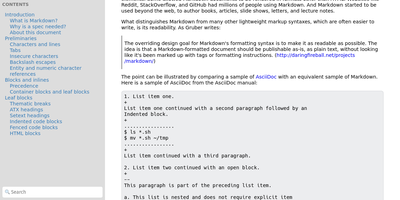
"Somewhat lightweight, low-friction" is how Silicon Notes' author describes the personal knowledge base - written after DokuWiki's editor "drove me mad" and no existing wiki quite fit. The philosophy is that small frequent annoyances compound into cognitive load with no return, so everything here is optimized for frictionless daily use. Notes are written in plaintext Markdown and rendered as clean HTML with Pygments syntax highlighting for code blocks; pages get bi-directional relationships (backlinks), so the knowledge base becomes a connected web rather than a folder tree; and full-text plus title search retrieves anything fast. A table of contents lives in the left sidebar - "where it belongs" - editable while you read without scrolling away. Page history tracks revisions for auditing and rollback, JSON export/import keeps everything portable, and the mobile layout is genuinely usable. The stack is deliberately minimal: Python and Flask with Mistune for Markdown and SQLite for storage - no big frameworks, just a few small dependencies. One honest caveat: there is no built-in authentication, so deploy it behind a VPN, private network, or reverse-proxy auth layer. For a solo engineer's brain, it is exactly enough.
GroqNotes
Introducing Groqnotes, the app that takes your audio lectures and transforms them into organized notes faster than you can say 'I should have paid more attention in class!' With the power of Groq's Whisper API, this Streamlit marvel listens to your lectures and then channels its inner librarian to create structured notes that even your future self will thank you for. It’s like having a personal assistant who never sleeps, fueled by a mix of Llama3-8b and Llama3-70b—because why settle for one when you can have two brainy llamas working for you? The larger model crafts the grand architecture of your notes, while the speedy one fills in the juicy details, ensuring you get the best of both worlds. So, whether you’re cramming for finals or just trying to make sense of your professor's 3-hour monologue on quantum physics, Groqnotes has got your back. Say goodbye to chaotic scribbles and hello to notes that are as organized as your sock drawer (or at least, we hope so)! Get ready to impress your classmates and maybe even your professors with notes that look like they were crafted by a team of caffeinated scholars. Groqnotes: because who needs sleep when you have structured notes?