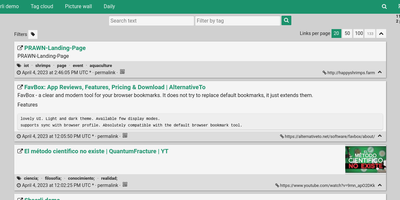
Shaarli
Personal, minimalist, database-free bookmarking - Shaarli is a philosophy as much as an app. Everything lives in a single compressed datastore file inside data/: no MySQL, no PostgreSQL, backup by copying one directory. That write-once/read-many file is usually served straight from OS disk caches, which is why a decade-old Shaarli instance with tens of thousands of links still responds instantly. Designed deliberately single-user, it saves URL, title, unlimited-length description, and tags (with autocomplete, renaming, and merging), marks entries public or private, and automatically strips utm_source and fb tracking parameters from saved URLs. That description field is why the community uses Shaarli as far more than bookmarks: a microblog, read-it-later queue, code-snippet base, pastebin, and shared clipboard between machines. Sharing is one click via bookmarklet or Android apps; consumption is per-tag RSS/Atom feeds plus a daily digest feed; search is full-text with tag filtering. A REST API opens it to any client, a plugin and theme system extends the PHP core (Markdown rendering, thumbnails), and import/export uses browser-standard Netscape HTML - your data enters and leaves freely. LDAP login is supported, no telemetry is sent anywhere, and the UI degrades gracefully without JavaScript. The anti-cloud Delicious.
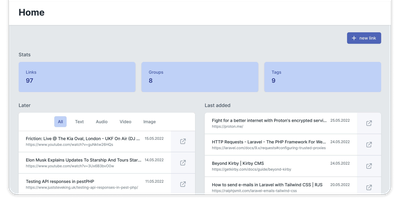
Servas
Get ready to turbocharge your bookmark chaos into a well-oiled machine with Servas, the self-hosted bookmark wizard! Wave goodbye to the days of digital clutter and say hello to a world where your favorite links are as organized as a librarian's bookshelf. With Servas, you can tag-team your URLs into submission, categorizing them with the finesse of a ninja using tags, groups, and even the mystical art of nesting. But wait, there's more! The 'Later List' is your digital pocket, ready to safely tuck away those 'read-me-soon' treasures for a rainy day. And for those who live life on the edge of their browser, the Servas Chrome extension is your trusty sidekick, zapping sites into your collection faster than you can say 'bookmark'. Multiple user accounts? Check. A design so responsive it practically does yoga? Double-check. And for the security-conscious, Servas flexes its muscles with Two Factor Authentication. Hosted on RepoCloud, your bookmarks won't just be organized; they'll be living the high life on cloud nine, without the sky-high costs. So, why settle for less when you can have the best seat in the house for your bookmarks with Servas on RepoCloud?
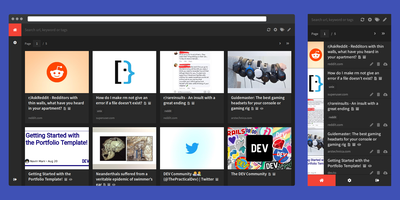
Shiori
Most web links eventually break - the sobering statistic Shiori, a bookmark manager with archiving by default, is built on. Its answer is archiving by default - where possible, every bookmark you save gets a clean, readable offline copy parsed from the page, ads and navigation stripped, so the article survives even after the original URL dies. Conceived as a simple Pocket clone and written in Go, the entire server is a single binary using roughly 25-30 MB of RAM with SQLite out of the box (Postgres and MySQL supported) - genuinely the lightest archiving bookmark manager you can run. Saving is one click through the Firefox and Chrome extensions, and finding things again is where Shiori quietly outperforms its size: full-text search covers the archived page content, not just titles and tags, so you can find that article by a phrase you remember from paragraph six. Reader mode presents the cleaned text; archive mode shows the preserved page. It's dual-interface by design - a pretty web UI (installable as a PWA on mobile) and a complete CLI for terminal devotees - plus a REST API for scripting. Pocket imports work natively, and Netscape HTML handles browser imports and exports. Multi-user support included. MIT-licensed.
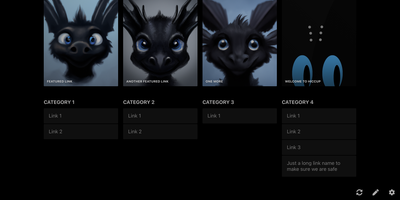
Hiccup
"Get to your most important links, FAST" - Hiccup's README states its whole mission in that one line, and the static start page delivers it. It is a client-side React single-page app - no backend, no database, no accounts - driven entirely by a config.json that defines featured link cards, categorized sections, and search providers. The search bar is the power feature: it queries your own links by name, URL, and tag while simultaneously offering external providers like Google, DuckDuckGo, and Amazon (plus custom URL-template providers you define), with arrow-key navigation and Enter to launch, so muscle memory replaces mousing. Editing happens in the browser - drag and drop links and background images, tweak cards in edit mode - with changes persisting to localStorage; a built-in config manager exports the JSON for hosting, and remote profile loading pulls a shared config across every browser and device you use. Multiple profiles keep home-server, work, and dev-tool link sets separate. PWA support installs it on a phone home screen, caching strategies keep it fast offline, read-only mode suits kiosk displays, and Cmd/Ctrl+/ reveals the full hotkey reference. Serve it from any static host and point your new tab at it.
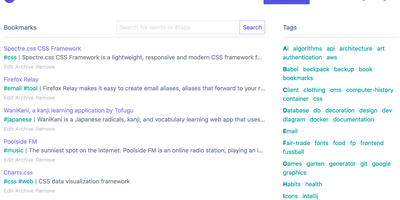
linkding
For people who found del.icio.us perfect and everything since bloated, linkding is the bookmark manager - a Django application whose entire design goal is saving and finding links with zero friction. Paste a URL and it fetches the title, description, favicon, and preview image automatically; organize with tags, search full-text across everything, mark bookmarks unread for read-it-later, attach Markdown notes, and bulk-edit whole selections at once. Its answer to link rot is archiving: bookmarked pages can be snapshotted automatically, either submitted to the Internet Archive or saved as local HTML files, and a documented SingleFile browser-extension integration uploads full self-contained page captures straight to your instance. Official Firefox and Chrome extensions (plus a bookmarklet) make saving a one-click habit, the UI installs as a Progressive Web App on mobile, and multi-user support with bookmark sharing - to users or logged-out guests - covers families and teams, with SSO via OIDC when needed. The REST API (create, search, filter by tag) has spawned a genuine ecosystem of community mobile apps and libraries. Operationally it is famously boring in the best way: one small container, SQLite by default, automated migrations, and a zero-breaking-changes policy. Import and export use standard Netscape HTML. MIT-licensed.